Monday, November 25, 2019

Sparking Student Interest in Coding

Computer science, computer programming, and coding are all areas that can be very intimidating to both students and teachers when brought into instruction in the classroom. Because of this, it is important that the teachers facilitating and guiding code in the classroom not only a growth mindset in their students, but also spark student interest in the coding activities.

As an elementary educator, more specifically a first-grade teacher, I find it very important to find ways to intrigue and engage my students in any content. Student engagement is even more important when introducing a concept as intricate as coding. This engagement and interest can be tricky because to many teachers and students, coding is an abstract concept that can be hard to bring to life, thus making it hard for students to grasp on to the idea and run with all the opportunities and possibilities that can come from coding.

To find out ways and strategies to get students interested in computer science, click here!

Student interest, as well as a growth mindset (grit), is crucial to young coders because of the inescapable failure that comes along with coding. This failure can be very discouraging to students, but when teachers preface a coding opportunity by explaining this fate, students can expect it and better deal with the frustration. Like Brookhouser and Megnin (2016) state "all computer programmers- from preteen amateurs to full-time professionals-experience bugs, errors, and frustrations all the time. In fact, encountering and fixing problems is almost entirely what they do" (p. 66).

Check out this well-prepared lesson in an elementary classroom that includes an introduction to coding, a teach model of coding, a group collaboration to guide the BeeBot through the map, and an opportunity for students to investigate and explore on their own. If this doesn't scream engagement and interest, then I don't know what does!


One of my favorite aspects of this lesson occurred from timestamp 3:30 to 4:40. During this time period in the lesson, the students run into a failure, or bug, within the code the students had programmed the BeeBot to perform. When the students experienced this failure, the class was able to regroup and reprogram the BeeBot to perform the correct instructions. This segment within the lesson directly supports the statement that Brookhouser and Megnin (2016) made that "programs almost always fail to run the way our kids planned because computers can't read intentions! They follow instructions exactly, and humans almost never enter a perfect set of instructions on the first try" (p. 65).

BeeBots, as seen in the videoed lesson above, are not the only coding tool that can be used for elementary-aged students. Check out the link below to explore other coding tools for elementary school students.

https://www.commonsense.org/education/top-picks/best-coding-tools-for-elementary


References

Best coding tools for elementary. (n.d.). Retrieved from https://www.commonsense.org/education/top-picks/best-coding-tools-for-elementary

Brookhouser, K. & Megnin, R. (2016). Code in every class: How all educators can teach programming. Irvine, California: EdTechTeam Press.

Plotnick, N. (2015). 7 ways to get students interested in computer science. Retrieved from https://www.edweek.org/tm/articles/2015/12/07/7-ways-to-get-students-interested-in.html

Vacca, M. [Mr. Vacca]. (2017, December 3). Using beebots in kindergarten, 1st and 2nd grade classrooms- Hour of code with Mr. Vacca [Video file]. Retrieved from https://www.youtube.com/watch?v=uULpYYE1Agc


Monday, November 11, 2019

Social Media Interactions

Social media has become one of the most popular and powerful forms of communication and interactions one can have. As Hicks (2013) states, "part of the benefit of a social network is the ease it provides to be, well, social" (p. 153). On almost every social media platform, users have instant information, reactions, and opinions at their fingertips. Because of this nature of social media, these platforms have become a popular mode of bringing forth argument in various forms including words, images, and videos.

One social media platform in particular, Twitter, gives its users real-time access to posts called "tweets" and other user's reactions to those status updates. More often than not, these tweets are filled with intentional content used to make its readers feel a certain way, react a certain way, and respond a certain way. Below you will find a particular tweet that presents a constant argument among educators and the education world- teacher pay.


As you can see, the tweet itself and the responses have brief, but powerful content. This is because tweets are limited to the number of characters used in posts. As Hicks (2013) states, "the art and skill of composing something as seemingly simple as a tweet is more than simply typing a limited number of characters into a small box" (p. 142). This tweet takes into consideration the type of social media it is being presented on (short phrases that get straight to the point), the audience that will be captured by the post (teachers who relate to the frustration many feel about teacher pay), and the purpose behind posting a controversial issue such as teacher pay (to bring light to how teacher pay is not enough on its own to support families). Because of the power in the content and portrayal, various Twitter users were prompted to respond to the original tweet with their own opinions and experience on the suggested topic. As Turner and Hicks (2017) states, "often, we don't recognize that the simple act of sharing information itself makes a claim, positioning us in certain ways- and that those who read what we share can engage in the argument" (p. 104). 

Although this tweet did catch other users' attention, use a popular hashtag, and elicit a response from them, the composition of the tweet could have been different in order to have been more engaging. The use of visuals, emojis, call to actions, and even link to statistics on teacher salaries could have improved the effectiveness of this tweet. 

Finding the "just right" way to compose a tweet can be pretty tricky. To discover way to make your tweets more visually appealing and more effective in its design and content, visit the links included. 


References

Hicks, T. (2013). Crafting digital writing: Composing texts across media and genres. Portsmouth, NH: Heinemann.

HSTeachProbs. (2019, November 3). Tweet. 

Hutchinson, A. (2016). 8 tips for creating more effective tweets (from Twitter). Retrieved from https://www.socialmediatoday.com/social-networks/8-tips-creating-more-effective-tweets-twitter

Lufkens, M. (2017). The perfect tweet. Retrieved from https://medium.com/@luefkens/the-perfect-tweet-ece83ad60e4b

Turner, K. H., & Hicks, T. (2017). Argument in the real world: Teaching adolescents to read and write digital texts. Portsmouth, NH:Heinemann.


Wednesday, October 30, 2019

Revamping Video Texts

Fool me once, shame on you. Fool me twice, shame on me. I feel as if anytime you have an experience with something new, the second go-round is always a smoother and more effective process. This is no different when revamping an introduction video of myself.

My first introduction video was simple, vague, and to be honest, just flat out boring. However, with the help of the texts "Crafting Digital Writing" by Troy Hicks and "Argument in the Real World" by Kristen Hawley Turner and Troy Hicks, I was able to turn a boring and nonspecific video into what I would like to think a feel-good and visually pleasing representation of myself and my classroom.

Below you will find my Revamped Introduction Video in which I introduce myself and concepts, including argument, that we encounter in first grade.


When revamping this video, I looked to the mentor texts mentioned above for advice. I had always wondered if our initial introduction video posed another purpose other than allowing the online community to put names with faces. It was not until I read this statement that I realized the true purpose of the initial introduction video assignment. "Giving people- children, adolescents, and adults- an opportunity to play with a video editing task in a low-stakes manner is often a good way to introduce bigger projects such as digital stores or public service announcements" (Turner & Hicks, 2017, p. 97). Having the experience on the first introduction video, I felt more comfortable taking on this bigger assignment and applying new knowledge in its creation.

When brainstorming and planning for this "re-do," I relied heavily upon the MAPS heuristic and digital video editing considerations mentioned in "Crafting Digital Writing" by Troy Hicks.

Below you will find an image explaining the MAPS heuristic retrieved from a blog post by Renee Boss.

Image result for MAPS heuristic


When reconsidering my video, I took into consideration the audience and the purpose behind my video. In my initial post, my video was simply to quickly introduce myself to a group of people- not too many details, but just enough to count. However, my revamped video serves to connect myself with my first grade parents and introduce them to who their student's teacher will be, as well as,  and overview to what they can expect to see throughout the course of the year. I also took into consideration three digital video editing ideas that were mentioned within the mentor text. Those video editing ideas were: narration, film effects, and sound effects and music. As Hicks (2017) states, "the various visual and audio effects serve in much the same way as word choice, sentence structure, or punctuation do in print texts: each has a different rhetorical purpose and effect" (p. 110). For the narration consideration, I felt it important, just as in my initial video to be the one narrating the video since I am introducing myself to my parents for the school year. They want to hear my voice and is important that the information comes from me as the teacher. For the film effects consideration, I shifted from an ongoing video of myself talking to the camera in my initial video to a video that is filled with images from my own classroom. This shows the parents glimpses into the school year and keep them engaged throughout the video. For the sound effects and music consideration, I decided to include background music in my revamped video. This gave my video a "happy go lucky" vibe that is inviting and calming to parents and students.

For tips of other ideas of what to consider when editing videos, check out the link below.

https://www.makeuseof.com/tag/8-tips-editing-videos-like-pro/

For advice on common video editing mistakes and how to avoid them, check out this link below.

https://www.techsmith.com/blog/common-video-editing-mistakes/


References

Hicks, T. (2013). Crafting digital writing: Composing texts across media and genres. Portsmouth, NH: Heinemann.

Lockhart, J. (2018). How to edit videos like a pro: 8 tips you need to master. Retrieved from https://www.makeuseof.com/tag/8-tips-editing-videos-like-pro/

Patton, D. (2017). Avoid these 7 common video editing mistakes. Retrieved from https://www.techsmith.com/blog/common-video-editing-mistakes/

R Boss. (2015, February 15). Learning to muse: Students should create, compose, & connect digitally. Retrieved from http://reneeboss.blogspot.com/2015/02/why-students-should-create-compose.html#.XbpIOkVKh0s

Turner, K. H., & Hicks, T. (2017). Argument in the real world: Teaching adolescents to read and write digital texts. Portsmouth, NH:Heinemann.

Sunday, October 6, 2019

Effective Infographics

We see them everywhere, but our brains don't register what we are actually looking at. Maybe we are simply accustomed to them in our daily lives. Maybe they don't catch our eye. But maybe, just maybe, they are the things we need to enhance and revamp argumentative writing. Infographics could be the addition that arguments have always needed to engage and persuade its viewers.

But what is an infographic? A simple, yet powerful definition of an infographic is provided by a group of students within a text by Turner and Hicks (2017). The group of students defined an infographic as "any static visual presentation that creatively incorporates the use of words, statistics, and images in order to convey a message" (pg. 63). By this definition, there are many infographics out there in the world, but only few of the many are effective in their design. Turner and Hicks (2017, p. 62) also list some recurring themes of effective infographics that are important to keep in mind when determining the credibility of an infographic or deciding how to incorporate an infographic within an argument. These themes include the data within the infographic having a captivating storyline,  having reliable sources, being visually engaging and pleasing, and being easy to land in the eyes of the public.

Check out this short video that aligns with Turner's and Hicks' views and explains what makes an effective infographic:


Also, check out this Hubspot blog that lays out the dos and don'ts for creating an effective infographic.

Because infographics are used to enhance the argument of the writer, one of the most important pieces of infographics are their design. The audience of the infographic needs to be visually engaged and interested so that the message can be conveyed appropriately. For this to happen, the designer needs to apply CRAP design. According to Turner and Hicks (2017), CRAP design is a "simple set of criteria on which to base effective designs: contrast, repetition, alignment, and proximity" (p. 40).


Below you will find my Inpresentation on CRAP design (the good kind).

References

Easelly: Infographic Design Tips & Tutorials. (2018, September 24). What makes an effective infographic? Retrieved from https://www.youtube.com/watch?v=rl9ZcfKt8sY

L Toner. (2017, July 28). 8 dos and don'ts for creating effective infographics. Retrieved from https://blog.hubspot.com/marketing/dos-and-donts-infographic-creation

Turner, K.H., & Hicks, T. (2017). Argument in the real world: Teaching adolescents to read and write digital texts. Portsmouth, NH: Heinemann.


Monday, September 16, 2019

Considering Images in "Born Digital" Arguments

We live in a fast-paced, instant, and digital world. Recent generations have been described as "born digital" because of their upbringing in the digital age (access to digital technologies and the Internet). Not surprisingly with this true digital age that we find ourselves in, many modes of information we intentionally search for or come across by pure happenstance happen to be "born digital." According to Turner and Hicks (2017) these "born digital" items are defined as those "created and managed in digital form" (p. 18).

Because of the "born digital" aspect of our everyday lives, argumentative stances have made their way into our digital lives. Social media platforms, music streaming devices, television channels, and many more digital avenues have been overcome with argumentative posts and/or commercials. And because of the fact-paced aspect of our everyday lives, these arguments have commonly come in the form of images. According to Turner and Hicks (2017) "digital arguments that use images...allow writers to use various media to marshal evidence, underscore claims, provide warrants, and acknowledge rebuttals" (p. 24), everything needed for a strong argument.  The images used to bring up a controversial or argumentative topic are full of deeper meaning and persuasion. The creators of these images and the authors or businesses who choose to use the images within their work hope to catch the attention of any and all who come in contact with their work.

But how exactly can images elicit argumentative language? Check out this video to find out the multiple ways in which images can be classified visual arguments.

 
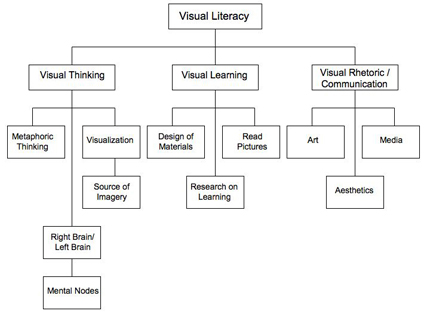
These visual arguments can be classified as, more specifically, visual rhetoric because of their motivation to convince the audience to react in a particular manner to the image.  As seen in the image below from the Purdue Online Writing Lab (OWL) visual rhetoric falls under the umbrella of visual literacy along with visual thinking and visual learning.


However, not every image you come across can elicit responses and action from an audience. "The illustrations you use, the charts or graphs that make up a presentation, and even the photographs you place within a design will have significant impact to whether an audience takes you seriously" ("Visual Rhetoric: Use of Images," n.d.).

In conclusion, images can have a huge impact on our attitudes toward social and emotional topics. In our digital world, digital, and most times, visual arguments will fill our feeds as we go about our day. As we come about these images, let us observe them and allow them to let us feel something, respond in a particular way. And when we want to create our own argument, let us choose a powerful image that can convey a powerful message.

References

Hill, M. (2013, April 25). Visual Arguments. Retrieved from https://www.youtube.com/watch?v=xCYf3J88EzA

Turner, K.H., & Hicks, T. (2017). Argument in the real world: Teaching adolescents to read and write digital texts. Portsmouth, NH: Heinemann.

Visual Rhetoric: Overview. (n.d.). Retrieved from https://owl.purdue.edu/owl/general_writing/visual_rhetoric/visual_rhetoric/index.html

Visual Rhetoric: Use of Images. (n.d.). Retrieved from https://owl.purdue.edu/owl/general_writing/visual_rhetoric/visual_rhetoric/visual_rhetoric_images.html

Sparking Student Interest in Coding

Computer science, computer programming, and coding are all areas that can be very intimidating to both students and teachers when brought in...